

Tasks with dependencies
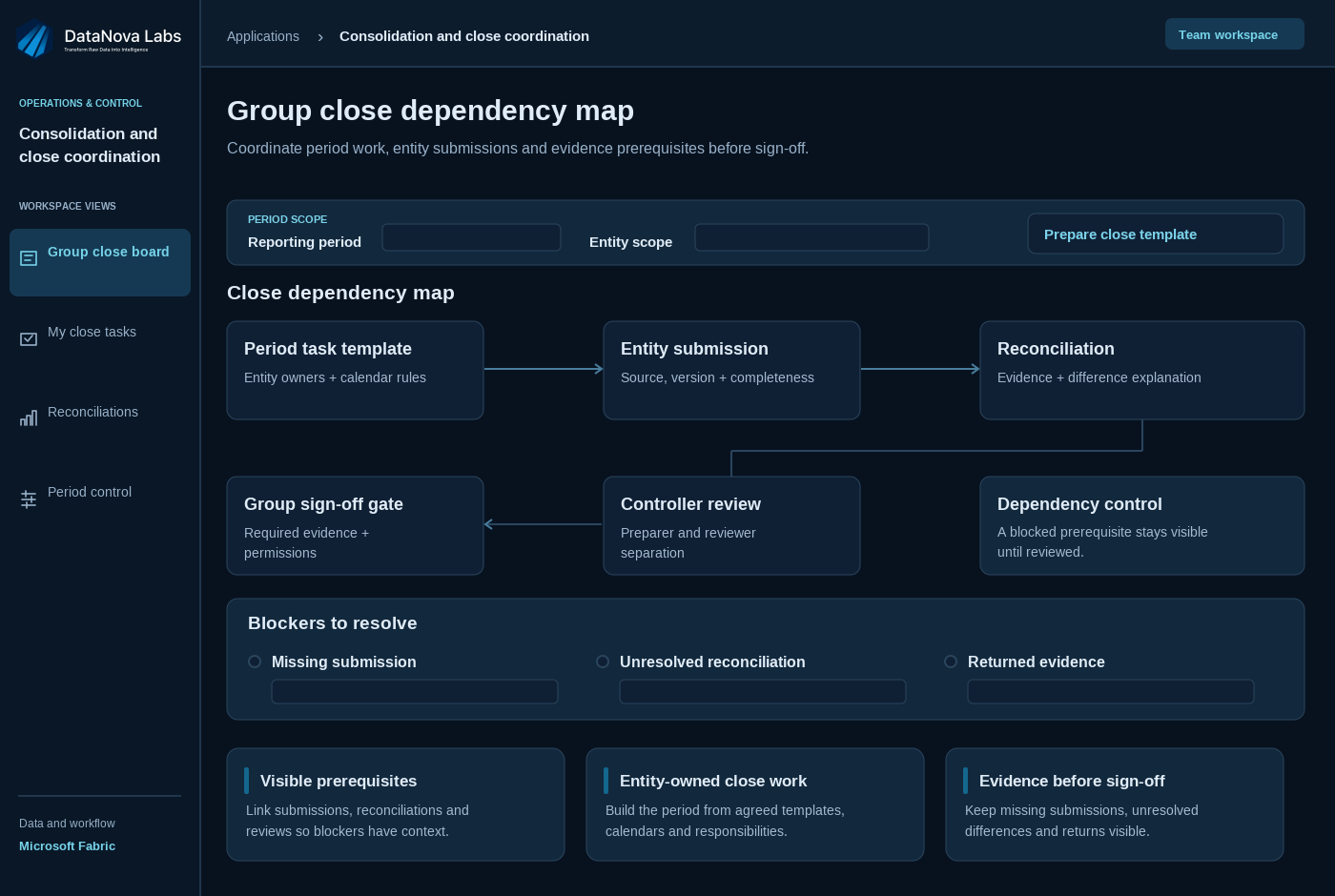
Show the prerequisite work and the owner responsible for each close stage.
Prepare a financial close workspace for entity submissions, recurring tasks, reconciliations and sign-off, with separately scoped consolidation rules and Microsoft Fabric reporting.
Prepared with you.Your rules, roles and setup agreed before the trial.
A consolidation and close-coordination app organises period-end work, entity submissions, dependencies and review evidence. Where agreed, a separately designed consolidation model brings approved financial data together using finance-defined accounting rules.
A green checklist is not enough. Group finance needs to see which submissions, reconciliations and reviews support the period's sign-off.
Show the prerequisite work and the owner responsible for each close stage.
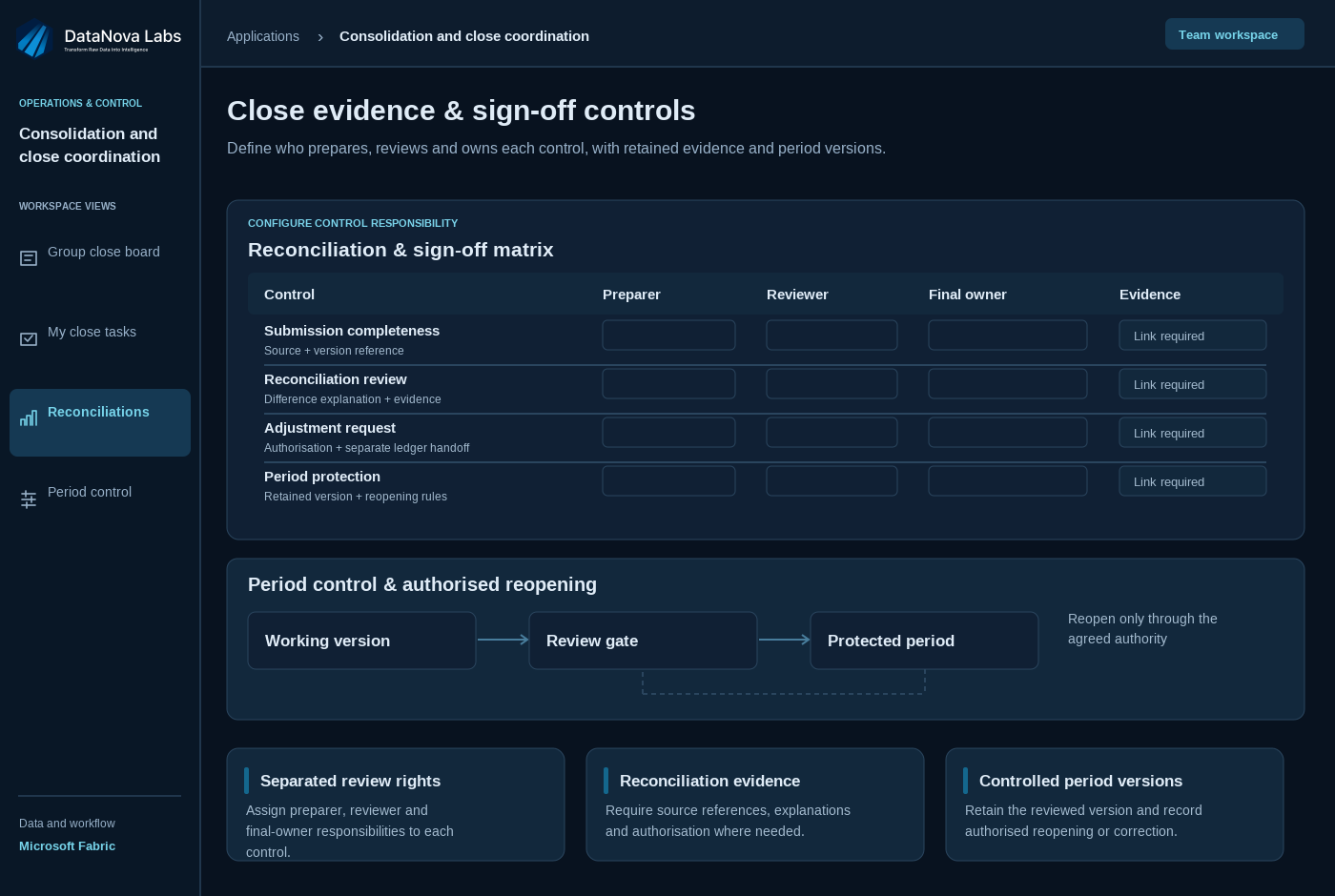
Connect entity submissions and reconciliations to preparer and reviewer controls.
Separate completed work, final approval and authorised period reopening.
The layouts show close coordination, evidence and review gates. Specialist consolidation calculations remain a separately defined accounting workstream. Your workspace is configured around your users, data and agreed workflow.
Entity progress, deadlines, dependencies and blockers.
Assigned preparation, evidence and returned work.
Differences, explanations, supporting files and sign-offs.
Versions, approved adjustments, locks and authorised reopening.
Use this as the scope checklist for a practical build. We confirm what can be reused, what needs configuration and what needs development before implementation.
Create period-specific tasks from approved templates, with entity ownership, deadlines, time zones and working-day rules.
Make prerequisite tasks, missing submissions and unresolved exceptions visible. An attempted task cannot satisfy a blocked dependency.
Capture source references, period, version and responsible controller. Validate completeness and retain a controlled review trail.
Attach or reference supporting reconciliations and record explanations for differences. Define tolerances and the reviewer who can resolve an exception.
Separate preparer, reviewer and final approver rights where required. Record returns, changes, delegated cover and approval reasons.
Organise proposed adjustments with evidence and authorisation. An app approval does not itself post the journal into a ledger.
Protect the agreed completed period and record authorised reopening or corrections. Preserve the earlier evidence and sign-off history.
Review close progress, late work and submission quality by entity. Connect approved reporting measures to the underlying reconciliation context.
Publish the task calendar, ownership and entity requirements.
Collect evidence and resolve completeness or reconciliation issues.
Complete the authorised review stages and dependencies.
Retain the agreed version and review exceptions before the next cycle.
Returns, rejections, cancellations and corrections follow the rules agreed for your process. Each decision retains its owner, reason and relevant record version.
These are implementation requirements to agree and verify, rather than a claim of certification or automatic compliance.
Define record and field access by role, entity, department or project. Separate preparation, approval, administration and export rights, with server-side enforcement.
Agree thresholds, approval stages, delegated cover and escalation. Retain actor, time, reason and the version reviewed, including returns and resubmissions.
Agree file types, size limits, malware handling, document access and retention. Validate imports and show rejected rows instead of silently losing information.
Keep failed notifications, blocked tasks and integration errors in owned queues. Control retries and overrides, then reconcile the actual downstream outcome.
Agree the first workflow and prove it against your acceptance criteria. Add connections or specialist capability when the source systems and controls are ready.
Close task completion is not proof of correct consolidated accounts. Consolidation calculations, ledger posting, statutory reporting and accounting-policy compliance require specialist scoping, reconciliation and authorised finance sign-off.
For each connection, we verify source access, API capability, licensing, mappings, update frequency and failure handling. Hosting, identity, document storage, retention and any external-user requirements are confirmed during design. Integration names do not imply a prebuilt connector.
Share your requirements. No card or commitment.
Describe the result you need and the information you work with. We can help you identify a suitable existing application or scope a tailored pilot.
A card is required when you start a trial. An enquiry does not start a subscription or commit you to a project.
Both assisted routes include a 30 day free trial, starting after onboarding and environment setup. Card required at signup. No charge until your 30 day trial ends.
If an existing application meets your requirements without additional mapping or implementation, implementation and the 30 day trial are free. Normal subscription charges begin after the trial, under your agreed terms.
We agree the application, mapping, workflows and implementation quote upfront. We then prepare the agreed pilot for your 30 day free trial. If you choose to proceed afterwards, the quoted implementation fee and monthly subscription become payable.
We confirm the pilot deliverables, preparation, trial start and decision process together. Any work beyond the agreed pilot scope is discussed separately.
Clear scope, controlled data and a trial route agreed with you.
Microsoft Fabric Apps availabilityNo. Close coordination manages work, evidence and approval. Financial consolidation also requires defined accounting mappings, currency, ownership and elimination rules. The latter is a separately scoped specialist model or system integration.
Yes. We can define shared templates with entity-specific tasks, owners, calendars and dependencies, while giving group finance an authorised consolidated progress view.
Only through separately authorised integrations. App approval, accounting posting and an operational period lock must each have appropriate authority and confirmed source-system outcomes.
The app can support your defined controls and retain evidence. It does not certify accounting or statutory compliance; group finance and the appropriate specialists approve the rules, reconciliations and reporting treatment.
This is a configured application offer, not an app automatically enabled at signup. We agree the fields, workflow, permissions, source data, hosting and acceptance checks first. Existing fit, configuration and custom development are confirmed before your assisted trial.
Fabric can connect the data and reporting foundation. DataNova designs and implements the app interface, validation, workflow and access controls. Microsoft's native Fabric Apps capability is currently in preview; where it is considered, we verify tenant enablement, regional availability, capacity, authentication and suitability. Complex transactions or external access may require a different agreed application architecture.
We review the process, source access, users, controls and required connections, then separate the app scope, implementation, platform or capacity costs and optional integrations in the quote. We also agree onboarding, support ownership, service hours and escalation routes. The existing assisted-trial terms apply after onboarding and environment setup.